714-260-3371

Customer Support

Mon - Fri: 9:00 - 4:00PM

Online Store Always Open

EGP-PACKAGING-30-YEARS-EMBLEM-HOMEPAGE

714-260-3371

Customer Support

1×1 METALIC SQUARE LABEL LAYOUT INSTRUCTIONS

Facebook
LinkedIn

Setting Up Your 1x1 Metalic Square Label Layout

Use this guide to prepare your 1×1 metallic square label artwork in EGP Packaging’s template. Taking a few minutes to set up your file correctly prevents print issues and speeds up your order.

1) Locate the Square Roll Labels product page and download the template for 1×1 labels.
2) Unzip and open the pdf file in your editing software. (we are using Adobe Illustrator)

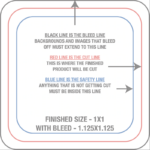
3) Each EGP Packaging label template has indicators which describe the different guide lines.

1x1-label-dieline

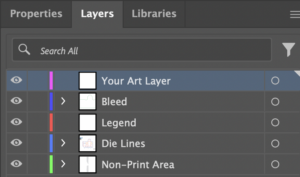
4) If using Illustrator to edit your pdf template you will also have layers designated for each part of the template.

TemplateLayers Illustrator

5) Import your design elements and begin aligning with the template.

6) If any part of your design is meant to bleed outside of the cut-line make sure that it extends to the bleed line.

7) Once your design looks good save the pdf, return to the corresponding product page, select qty and any other specifications you would like and add to cart.

8) Open your shopping cart to view your order. If everything looks good hit the check out button, upload your artwork and follow the check out process.

More to explorer